Overview
Enrollware automates all of your training site and training center operations in an easy to use, web based, secure application.
Your class schedule available online, anywhere, anytime
With Enrollware's database driven class schedules, your up-to-date schedule is always available on the web. Past classes are automatically removed from the schedule and when a class reaches it's maximum number of registrants, it's automatically marked as full and additional registrations are not allowed. This is all done with an easy to use, web based administrative tool. No more editing HTML and publishing web pages.
Accepting credit card payments for class registrations has never been easier
Your Enrollware subscription includes access to EnrollwarePay, our integrated payment processing system. Start accepting payments today at industry low rates.
Automatically generate and submit your rosters
Once your students register, their information is stored in your database forever. We use that same information for printing cards, certificates, and generating rosters. You won't find yourself re-entering a student's name over and over again.
No software to install or maintain
Enrollware's software is housed in a secure datacenter and maintained and updated by Enrollware developers. A web browser and an Internet connection is all that is required to access it. Check in from home, or even from your web enabled phone. We're constantly enhancing the application and as a subscriber, you'll benefit automatically with free upgrades.
Your data is secure and always available
Your data is protected in a datacenter with biometric access control. Daily backups are performed and stored in secure offsite facilities. You are the only one with unrestricted access to that data and since it's yours, you can export and download it at any time. As a client, you have access to your data 24/7/365 and as a client, we will never delete your data.
Class Scheduling
Scheduling classes couldn't be easier with Enrollware's automated system.
Your Admin Home Page
After logging into your password protected admin section, you're presented with a quick view of your upcoming classes. From this page, you can view, edit, or create additional classes.
Reusable Class Templates
Scheduling classes is made easier by Course Type Templates that you setup once, and re-use over and over. Course descriptions, prices, and book options are pre-configured on this page, but can be overridden when an individual class is scheduled.
Scheduling a Class
Pick the course type, instructor, location, start time, and maximum number of students, and you're done. Your class instantly shows up in your online schedule and is available for registrations.
Managing Classes
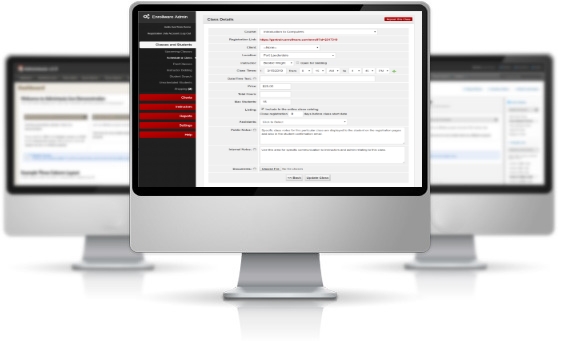
One convenient screen is used to manage all of the aspects of a scheduled class. Make changes to the class details and add/edit students here.
Rescheduling Students
Move students easily between scheduled classes. For those students who aren't sure which of the next available classes to choose, there is an unscheduled list, or 'holding area' where they can be temporarily placed.
Registration
The key to reducing the number of abandoned registrations (and increasing customers) is to make the registration process as smooth and hassle-free as possible.
Your Custom Class Schedule Page
Enrollware has several options for displaying your class schedule to your customers. The custom hosted schedule page maintains all of your contact information and current classes on one secure page. Your students select a class and click the link to start the registration process.
Registration Options
In the next registration step, students confirm their choice of classes and are given the option to purchase a textbook if applicable and configured.
Simple One Page Form
The main registration page is designed to be as simple and secure as possible. Once the student submits this page, they're asked to confirm the information, and the credit card is submitted for authorization. If it is declined, they can revise their payment information and try again. If it's approved, a configurable email confirmation is sent.
Calendar Views
As an alternative to the default class schedule, you can also choose to use a calendar with color coded classes to list your classes on your site. A dual calendar display is also available.

Payment Processing through EnrollwarePay
EnrollwarePay is a fully integrated card payment processing platform that is designed just for users of Enrollware software. This all-in-one solution tightly
integrates with the Enrollware class registration and management system and is offered at an industry low flat rate.

Easily accept credit card payments for your class registrations and training center products. EnrollwarePay offers the following advantages:
- Industry leading rates and no hidden fees
- Quick and painless on-boarding
- Funds deposited quickly to your bank account
- Integrated reporting and reconciliation
- Simplified PCI compliance
- Single point of contact - supported by Enrollware staff
Click to learn more about EnrollwarePay
eLearning
Enrollware supports the sale and tracking of any online course. If your online class requires a keycode, we provide keycode 'banks' where you can store these keys and automatically deliver them to your customers as they register. Keys can be easily combined with classroom sessions for courses requiring a skills check.
Key Management
An unlimited number of keycode banks can be created and used to deliver and track key assigments for your students. Sell keycodes 24x7 without ever having to manually send a key to a customer. Your students can start their class immediately after completing their registration.
Detailed Sales Reports
As each keycode is sold, it is sent to the student in a confirmation email, marked as 'used' in the keycode bank, and included in several reports accessible as in your admin screens.
Class Management
Enrollware provides you with the tools to efficiently run manage your classrooms. We eliminate the paperwork so you can focus on teaching your classes.
Student Check-in Facility
A custom check-in page is available for use at your facility. Set up on a spare computer, laptop, or ipad, this page allows your students to checkin on the day of the class and verify that their name is spelled correctly. Any changes they make are automatically applied to the database and used for card printing, rosters, and future communications.
Printable Student Lists
Prior to each class, you can easily print a PDF containing all of your registered students. Use it during class to ensure attendance and take notes as needed.
Client Tracking
Private client-based training is made easy with our Client Tracking module.
Client Management
Manage an unlimited list of client accounts with contact information and contact dates. Assign these clients to private classes or issue them promotion codes for class discounts and automatic tracking.
Client Activity Report
This report identifies all of the training activity for a specific client and date range. Exportable to Excel and can be used for invoicing your clients.
Instructor Tracking
With support for an unlimited number of instructors, Enrollware will track your instructor certifications, expirations, class counts, and other events.
Automatic Tracking
Instructor certifications are tracked and reported by discipline. This page provides a quick overview of your staff and allows you to easily monitor for expiring certifications.
Detailed Tracking Reports
Your instructor's entire teaching history is easily accessible, by class or discipline, and the Activity/Event log can be used as a diary to track training or monitoring events.
Roster Management
Enrollware eliminates the handling of paper rosters and duplication of effort. Your student information is now electronically stored from the minute they register.
Entering Test Scores
Following each class, use this simple page to update the test scores and student status.
Rosters
Once the information is entered, this page displays the AHA compliant roster in PDF form. From here, you can print or email the roster as many times as you'd like. There's no real need for paper though, the rosters are stored electronically forever.
Student Search
Easily search for students by last name, first name, email address, or phone number. Click on the search results to view the complete student record.
Class Information is Saved Forever
Out of the way yet still readily available, the Past Classes screen shows every class you've ever held. No more digging through paper records.
Quick Access to Rosters
All of your rosters are available for quick reference, emailing, or printing on the Finalized Rosters screen. This is also where a training center would access rosters from a training site if both were using Enrollware.
Card and Certificate Printing
Card printing made easy. No more alignment problems, mail merges, word templates, or wasted cards.
Print Cards in Two Minutes or Less
With this simple card printing process, you can print one or all of your certification cards efficiently and accurately. Need to reprint one card out of 20? No problem.
Custom Certificates
Create any number of custom certificate templates in Word and once they're uploaded to the system, you can print them for an entire class with just a few clicks. We'll fill in the variable information such as the student, class name, date, and instructor.
Administration
The functions within Enrollware are all managed through the secure and private administration pages.
Secure Admin Facility
Your custom admin facility is protected by a secure login page with industry standard password encryption.
Unlimited Users
You are in control of the users that access your system. Add as many admins or instructors as you'd like and each will have their own username and password. There are no limits.
User Details
For each user, you control the roles they're allowed to perform. For instructors, you can also specify exactly how their name is printed on the certification cards.
Unlimited Locations
Every detail about your site is configurable. Setup as many training locations as you'd like.
File Manager
The file manager is used to upload study guides or other documents to the site and make them available for download by your students. Your confirmation emails can contain links to these documents with instructions for class preparation.
AHA Training Centers
Enrollware provides automation for many aspects of your American Heart Association Training Center and is 100% PAM Compliant. Monitor your training site and affiliate
instructor activity, store rosters electronically, issue e-cards, and accept payments for card orders.
Training Sites and Affiliate Instructors
Your training sites and affiliate instructors interact in their own secure and private area in Enrollware. Instructors are prevented from
accessing data in other sites.
Training Site Rosters
Instructors enter their rosters into Enrollware and transmit them electronically to your training center. Electronic roster management and
record-keeping eliminates paperwork and makes your training center records available to you from anywhere via the web. Scanned documents can be uploaded, attached,
and stored with the roster data.
Instructor Payments
Accept and track electronic payments from your training sites and instructors for dues, roster fees, eCards, or supplies.
Electronic Instructor Tracking
All of your instructors teaching history is easily accessible, by class or discipline, and the Activity/Event log can be used as a diary to track training or monitoring events.
AHA eCards
Training centers can utilize our AHA Direct Connect feature to issue eCards directly from their Enrollware admin pages. Developed in conjunction with the AHA, eCards are issued with just a few clicks of the mouse, without having to re-enter data or import Excel files.